
Room Block Manager
// UX + UI
Room Block Manager is a feature I designed for Thynk, a hotel sales software, that lets sales teams set aside, edit and sync the rooms for a group booking in one place.
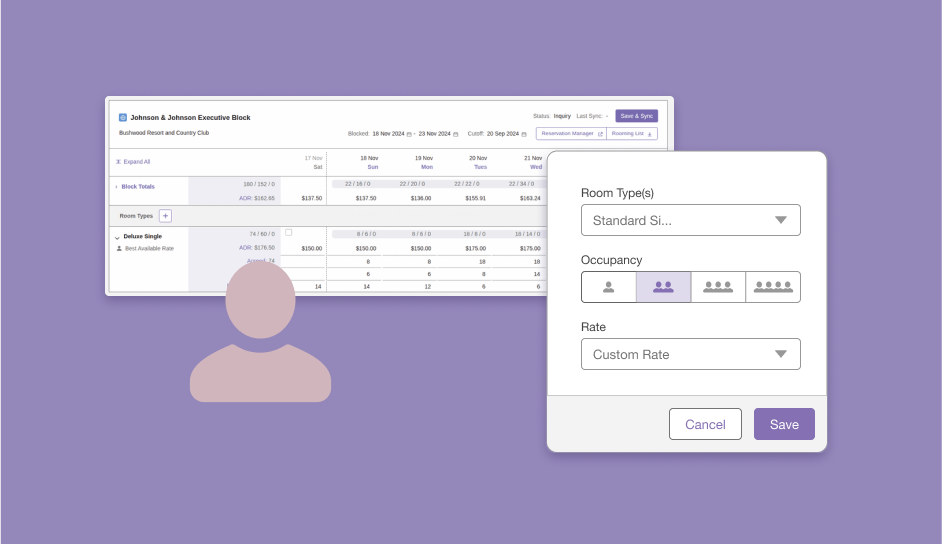
Thynk wanted group bookings to stay accurate across every property management system (PMS), so my goal was to make that simple for the sales teams using it.
Goal
Role:
UX/UI Designer
Tools:
Figma
Date:
January 2024

After it shipped, integration bugs on this topic fell by 50%+
and Thynk's revenue grew at least 1.5x.
Context
Thynk is hotel sales software, and room block management turns a group sale into reserved rooms.
Hotel sales teams use Thynk to sell rooms to groups. A room block is the set of rooms a hotel holds for one group, and each night carries four numbers. Because customers use different PMS, every block also has to match the hotel's own system.
Numbers needed for each night:
Rooms agreedBlocked in inventoryForecast to be usedPicked up by guests
Every connected system could overwrite a single room-count field, which caused near-daily errors.
Problem
Thynk stored a group's rooms in one "number of rooms" field. A change in any connected system could overwrite it, and there was no clear record of what changed. On top of that, blocks could not be edited, nothing stopped a user from agreeing to rooms the hotel did not have, and sales had no way to see how many rooms guests had picked up. Issues on this topic came up almost every day.
Current Solutions
Spreadsheet and email: The block lives in a sheet and someone retypes each change into the hotel’s PMS, so the two copies drift apart. Hotel teams still pair spreadsheets with email for room blocks and booking links.
Inside the PMS: In a system like Oracle OPERA Cloud, a block holds rooms by room type for a date range and fills through rooming lists, a booking engine or another reservation system. There is one copy, but every customer’s PMS works differently, and I had to design for all of them.
A sales system linked to the PMS: The block is kept in the sales tool and sent to the PMS through an interface, and negotiated changes update both sides. Industry guidance warns that blocking by room type forces constant adjusting, and that a booking in a room type the sales system does not know has nowhere to go.
Thynk before: One “number of rooms” field that any connected system could overwrite, with no record of what changed. Blocks could not be edited, and sales could not see pickup.
How might we?
How might we give sales teams one clear view of every room they have promised, held and sold?
Keep what the customer agreed separate from what the hotel holds in inventory?
Show at a glance whether a group can take more rooms?
Make a block quick to edit, including many nights at once?
Catch overbooking and sync problems before they reach the hotel's system?
Tell the user, not only a developer, when a sync fails?
Constraints
Salesforce Components
Thynk is built on Salesforce, so I had to reuse existing components in order to remain consistent with the other pages in the product
Different Systems
Customers used different systems and features were being built one PMS at a time, so the design had to work for all of them.
Old Data Model
Rooms were stored in one field, so I had to change how rooms were stored, not just how they looked. One page could hold many bookings, so I needed a scalable solution.
Users, Not Developers
When a sync failed, the person using the page and their admin needed to be able to see why.
Introducing
Thynk’s Group Bookings
Room Block Manager keeps Agreed and Blocked rooms separate, shows every night on one screen, and tells the user when a sync works or fails.
Thynk could ship one build to every PMS, and users have fail-proof way to manage room blocks.
Decision & Features
Scalability meets scannability.
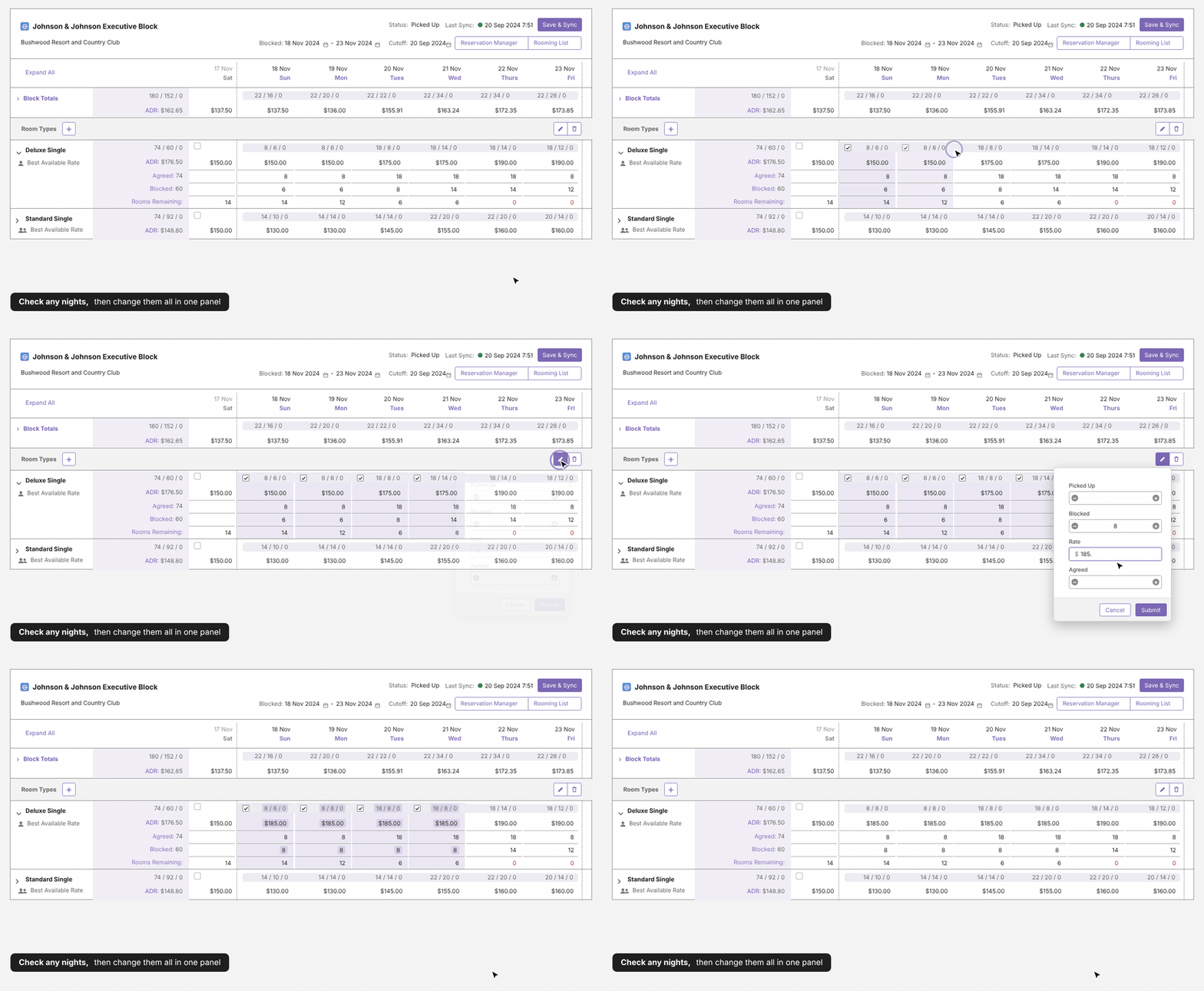
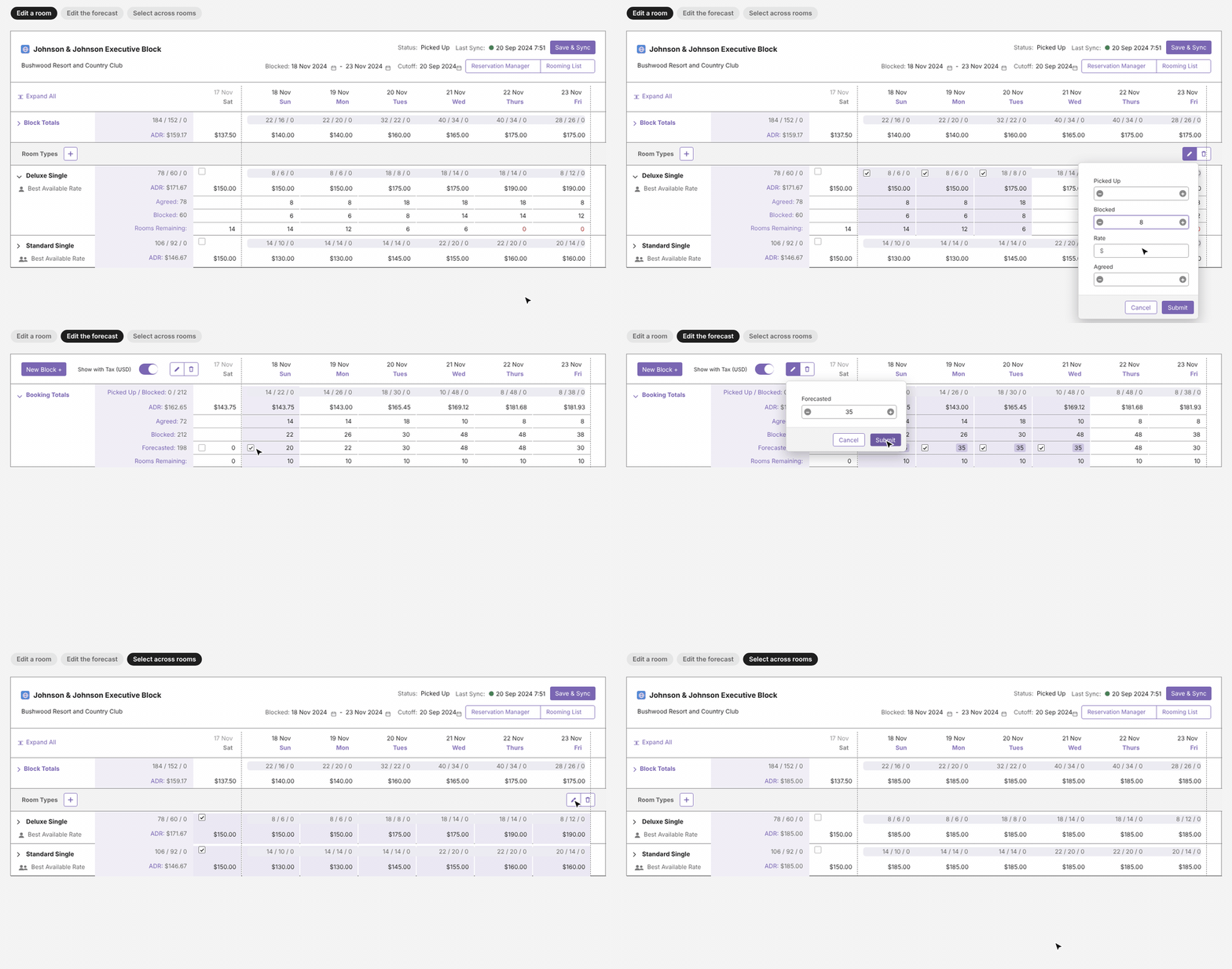
Changing the same value across a stay used to mean opening every night. Now a user can select several nights, set the value once and submit.
Edit once, not night by night
Scalability meets simplicity
A booking can be one room type or twenty, a weekend or a month. I had to build for many use cases while keeping the UI simple, with a lot of functionality underneath.
Scan first
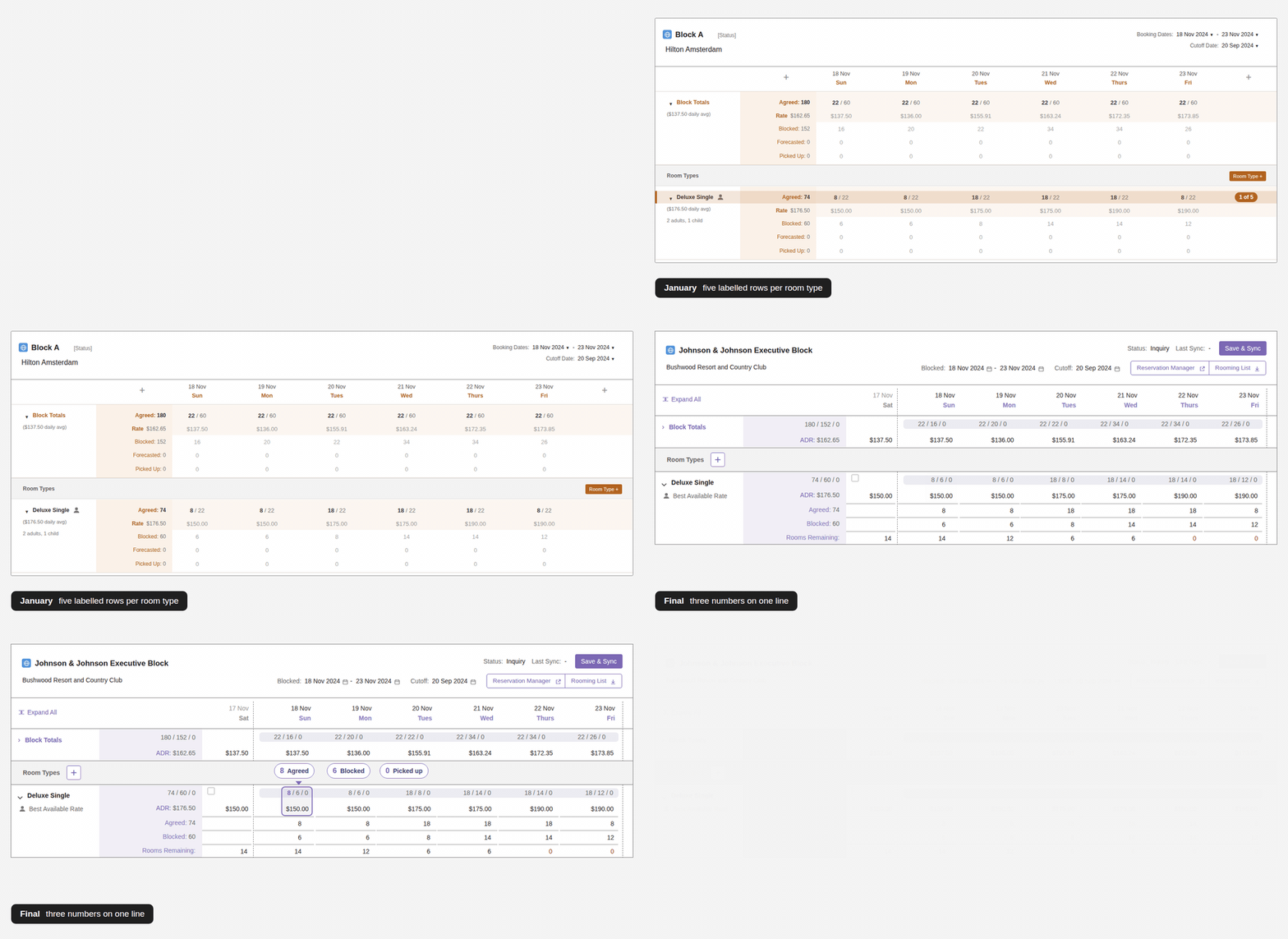
Collapsed, every room type is two lines: Agreed / Blocked / Picked Up, and the rate. Expand one room type, or Expand All, for the detail.
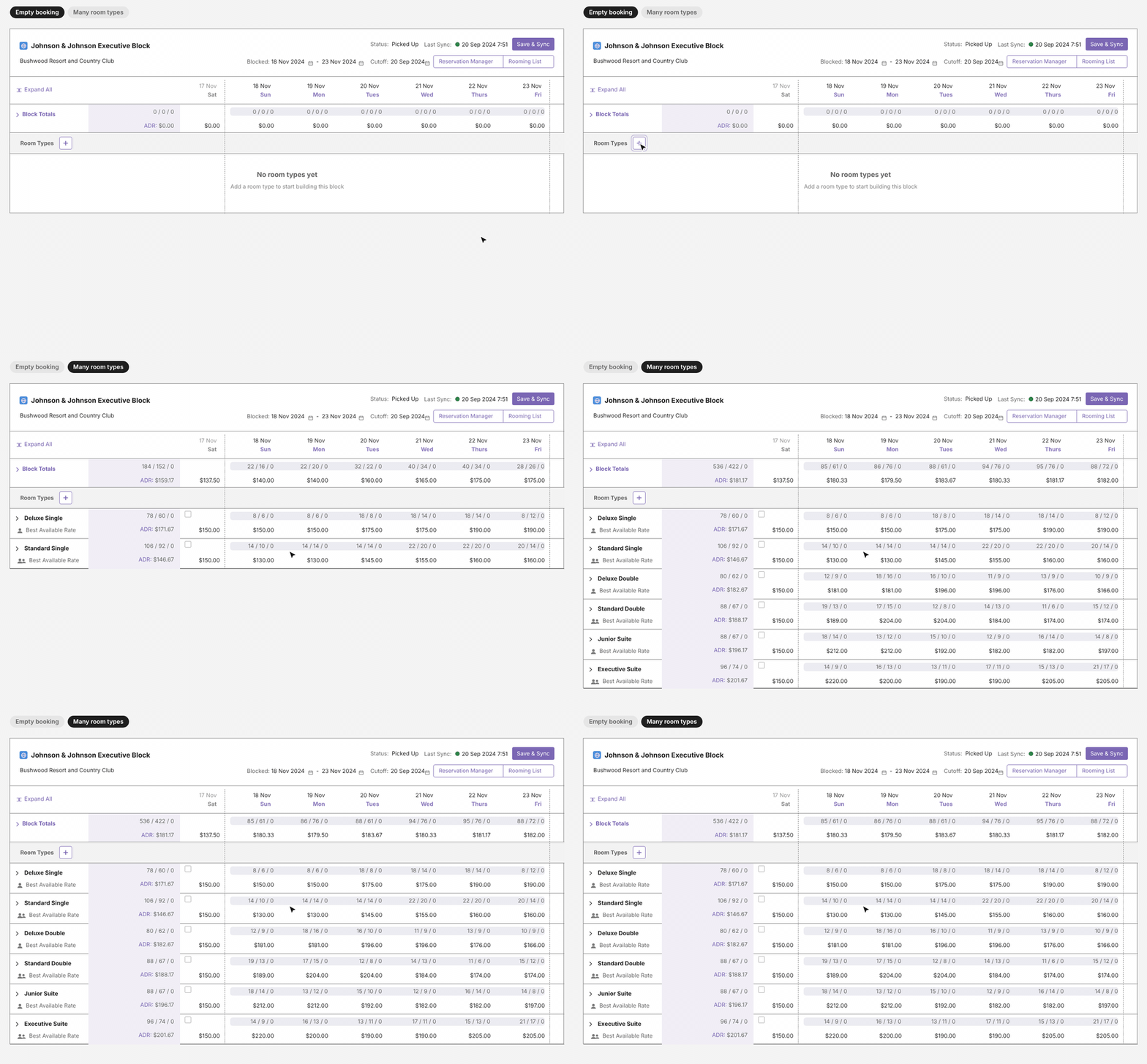
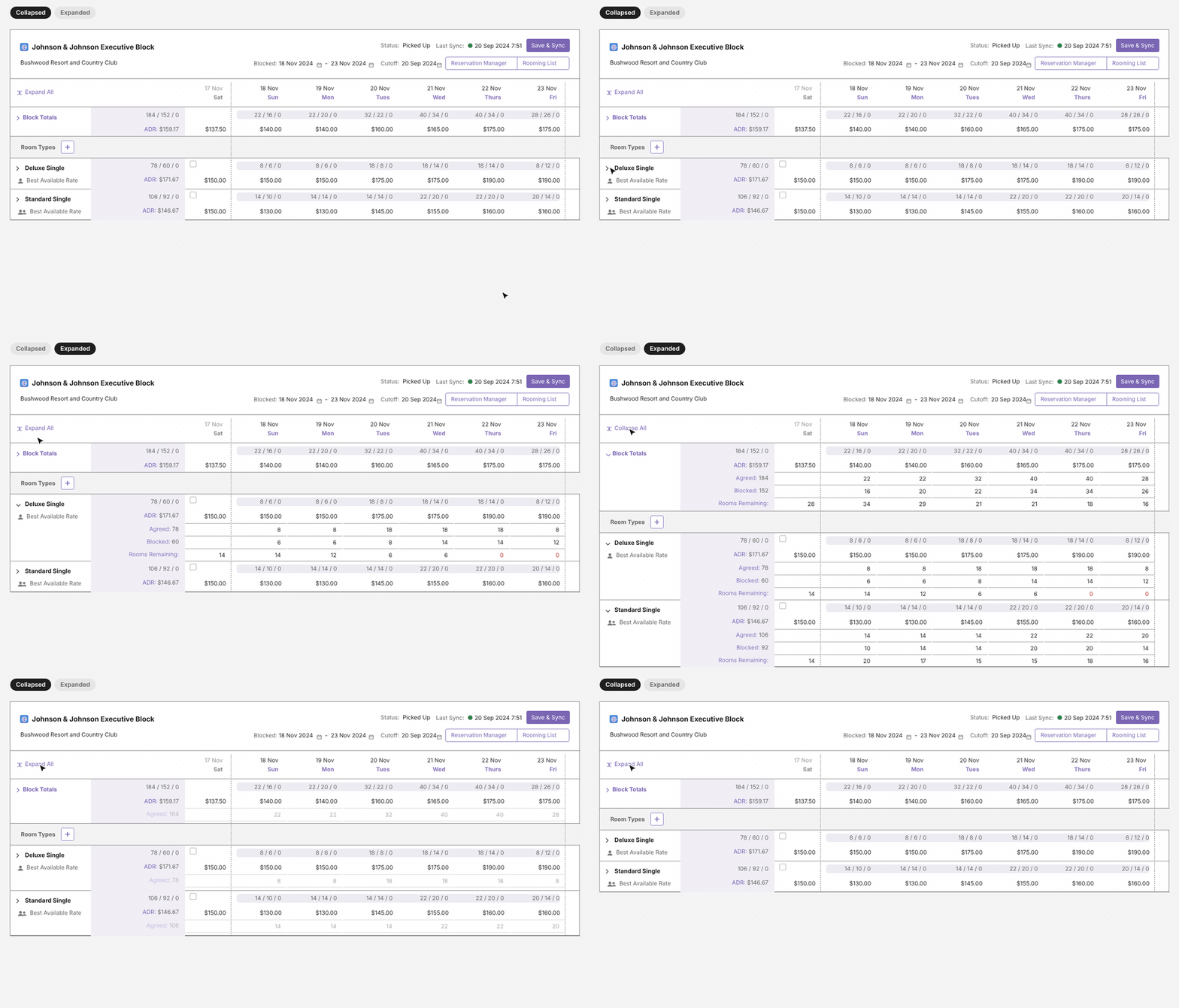
Each night shows Agreed / Blocked / Picked Up on one line, like 8 / 6 / 0. Agreed is most important during customer conversations , so I put it first for visibility.
Originally I had five labelled rows per room type, but after feedback, I made it faster to scan. Since sales teams compare rows, the rate is on its own line underneath.
Impact (some things I’m proud of)
Better experience:
Bugs decreased by >50% if not more. Issues had been almost daily, and they went close to 0 once customers fully adopted the feature, because each user got their own error message that their admins could debug.
Credibility:
Room Block Manager has been in use since 2024. Thynk's FAQ credits the real-time sync with a lower risk of double bookings.
Revenue increase:
This work has been credited with helping Thynk grow revenue by at least 1.5x and sign some large deals.
Scalability:
Before, Thynk had to build per PMS, so every feature had to be switched on or off system by system, or customers could not get the change at all. With dynamic filters and a processing layer (middleware) between Thynk and each PMS instead of a direct integration call each time, changes could roll out much more easily.